
FAQ: Bridge Adapter
Posted by Dara Holsters & Gear, Inc. on Oct 25, 2024
The Bridge™ Adapter: Holster Mounting Compatibility and Installation FAQ
For the past 15 years, we've heard the same frustration from holster users: why can't holster manufacturers use the same mounting hole pattern?
Many people refer to the Safariland mounting pattern as the "universal" hole pattern. In reality, it's simply one of the most widely used patterns in the industry. Many newer holster manufacturers adopt it because compatible attachments are readily available from holster supply companies, eliminating the need to design and manufacture their own mounting systems.
At Dara, we've developed our own mounting attachments, but we also recognize that customers have existing equipment they want to keep using. Whether it's a Safariland QLS, Blade-Tech Tek-Mount, or another preferred attachment, changing holsters shouldn't necessarily mean replacing an entire belt setup.
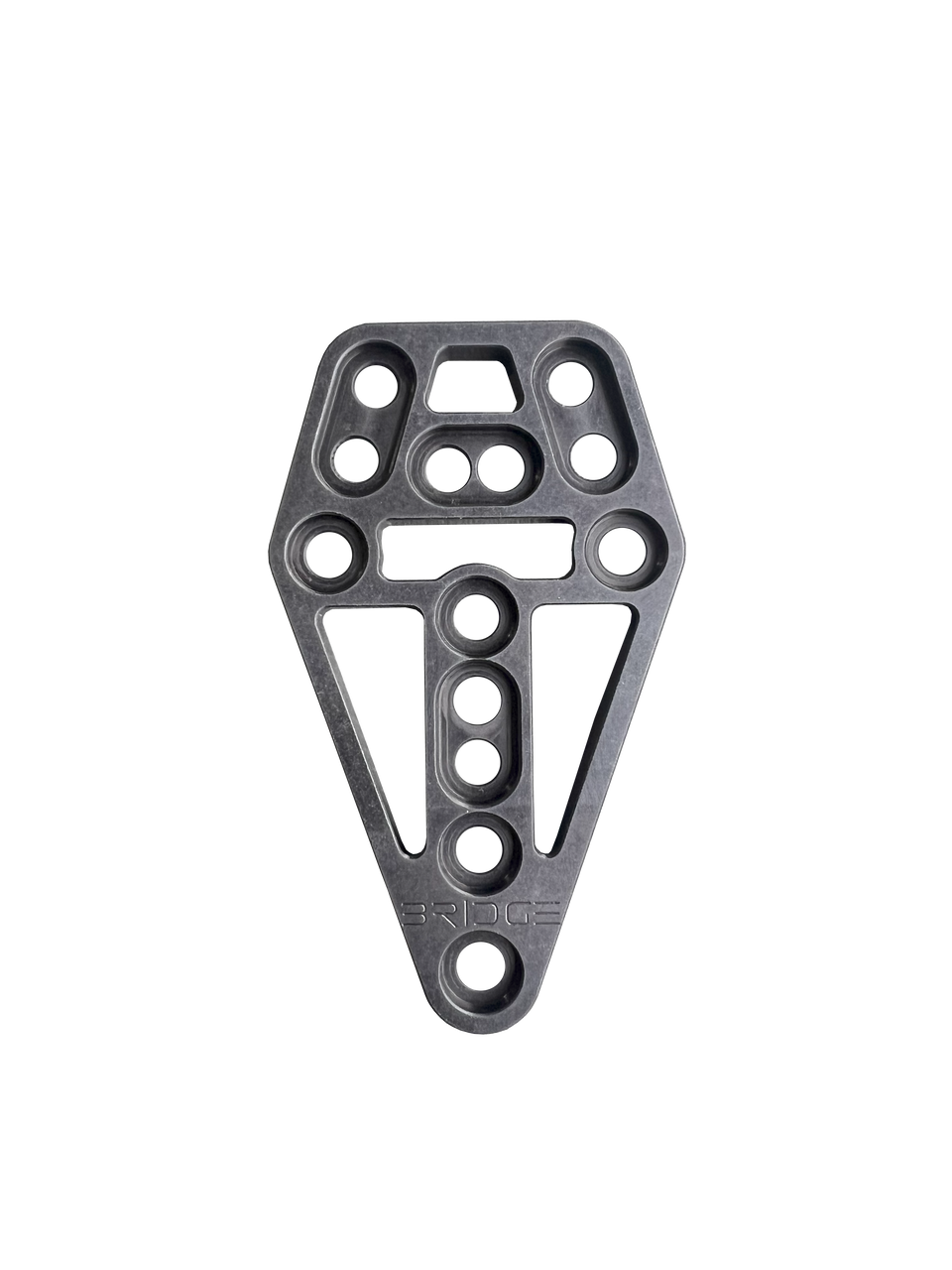
That's why we developed the Dara Bridge™ Adapter. The Bridge connects compatible holsters and attachments that use different mounting hole patterns, giving users more flexibility to combine equipment from different manufacturers without starting over.
Will your holster mount to Safariland QLS, Safariland UBL, Blade-Tech Tek-Mount, Alien Gear Rapid Force, or another manufacturer's attachment system? This FAQ explains which mounting patterns the Bridge supports, how to install it, what hardware you need, and how to confirm compatibility.
Quick links:
- The Bridge™ Adapter Product Page
- The Bridge™ with Specialty Hardware
- Bridge Installation Manual with Photos (PDF)
- Contact Dara Customer Support
What Is the Dara Bridge Adapter?
The Bridge is a mounting-pattern adapter designed to connect compatible holsters and attachments that would otherwise use different mounting hole patterns.
For example, someone who owns a Dara Level 2 Duty Holster may want to use a Safariland QLS system or UBL attachment already installed on their belt. The Bridge provides a way to connect supported combinations using the appropriate hardware.
It can also be useful for people who own holsters from multiple manufacturers but want to standardize their mounting system.
The Bridge does not change the firearm fit or retention level of a holster. It is also not a quick-disconnect device by itself. When used with a compatible quick-disconnect system, that separate system provides the release and locking function.
Bridge Adapter Overview Video
Watch the overview below to see how the Bridge connects different holster mounting systems.
Which Holster Brands and Mounting Systems Work with the Bridge?
The Bridge supports selected mounting configurations involving the following manufacturers:
- Dara Holsters
- Safariland
- G-Code
- Blade-Tech
- Blackhawk
- Alien Gear
- Comp-Tac
- US Duty Gear
- True North Concepts
- Guardian Warrior Solutions
Supported third-party attachment examples include certain configurations of the True North Concepts Modular Holster Adapter (MHA) and Guardian Warrior Solutions Bang Hanger.
Important: This list identifies supported manufacturers and mounting families, not every product they manufacture. Compatibility depends on the exact mounting pattern, attachment, and hardware.
Safariland QLS and UBL Compatibility
Will a Dara holster work with Safariland QLS?
Yes. The Bridge can connect supported Dara holsters to the Safariland Quick Locking System (QLS).
QLS is a separate quick-disconnect system consisting of a fork and receiver. It allows a compatible holster to be moved between mounting platforms without removing the belt attachment.
The Bridge adapts the mounting interface between the holster and the appropriate QLS component.
This can be useful if you already have QLS receivers installed on different belts or mounting platforms and want to use a compatible Dara holster with those setups.
The Bridge does not replace the QLS fork or receiver. Those components must be obtained separately unless included in another product package.
How Do I Install the Bridge with Safariland QLS?
Use the correct mounting holes and hardware identified in Dara's installation manual. The Safariland mounting pattern uses holes 3, 6, and 13 on the Bridge, according to the manual's numbered hole diagram.
Watch the installation video below before assembling the components.
Can I Attach a Safariland UBL to a Dara Holster?
Yes. The Bridge supports compatible Safariland Universal Belt Loop (UBL) mounting configurations.
The UBL is a belt attachment that positions the holster at a particular ride height. If you already use a Safariland UBL and prefer its position on your belt, the Bridge may allow you to retain that attachment when switching to a compatible Dara holster.
The UBL and Bridge perform different functions. The UBL determines the belt mounting position, while the Bridge adapts the mounting hole pattern.
How Do I Install the Bridge with Safariland UBL?
Watch Dara's installation video below and follow the hardware instructions for the exact components you're connecting.
Additional instructions are available in our Safariland UBL to Dara Holster Installation Guide.
Blade-Tech, G-Code, Alien Gear, and Other Mounting Systems
Does the Bridge Work with Blade-Tech Tek-Mount?
The Bridge supports selected Blade-Tech mounting configurations, including Tek-Mount applications.
Tek-Mount is a separate quick-connect mounting system. The Bridge provides an interface between supported mounting patterns, while Tek-Mount provides its own connection mechanism.
In Dara's mounting-hole reference, the Blade-Tech Tek-Mount pattern uses holes 7, 8, and 12. A Blade-Tech holster pattern uses holes 7, 8, and 10.
These hole references do not establish compatibility with every Blade-Tech product. Check the hardware matrix for the exact installation.
Can I Connect a G-Code Holster to Safariland QLS?
Yes, certain G-Code holsters can be connected to compatible Safariland QLS components using the Bridge.
G-Code uses several mounting configurations, and they do not all share the same hole pattern.
For example, Dara's Bridge instructions identify separate mounting-hole arrangements for G-Code GCA35, right-hand GCA33, and left-hand GCA34 patterns.
A customer also reported using the Bridge to connect a G-Code XST Level 2 holster to Safariland QLS.
Confirm the exact G-Code model and mounting hardware before ordering.
Will the Bridge Work with Alien Gear Rapid Force?
The Bridge supports selected Alien Gear mounting configurations. Certain applications require the Bridge package with specialty hardware.
One customer reported connecting an Alien Gear Rapid Force Level III holster shell to a Safariland QLS-equipped setup using the Bridge with specialty hardware.
This is a customer-reported installation and should not be interpreted as a guarantee for every Rapid Force holster or accessory.
View the Bridge with Specialty Hardware
Does the Bridge Work with Blackhawk Mounting Systems?
The Bridge supports selected Blackhawk mounting configurations. Certain Blackhawk applications require specialty hardware.
A customer reported using the Bridge with specialty hardware to connect a Dara holster to a Blackhawk modular thigh-mount platform.
Check the exact Blackhawk mounting pattern before installation.
Can I Use the Bridge with a True North Concepts MHA?
Yes. Selected configurations involving the True North Concepts Modular Holster Adapter (MHA) are supported.
The MHA is a separate belt-mounted platform. Depending on the configuration, the Bridge can provide the interface between the holster and other mounting components.
One Dara customer reported using the Bridge with a Dara Level 2 Holster, True North MHA, and Safariland QLS fork.
Compatibility depends on the complete assembly, not just the MHA itself.
Does the Bridge Work with Guardian Warrior Solutions Bang Hanger?
Selected Guardian Warrior Solutions Bang Hanger mounting configurations are supported.
Verify the exact attachment and hardware before installation.
Bridge Adapter Mounting Hole Reference
The Bridge uses numbered holes and slots to accommodate different mounting patterns. The numbers below correspond to the official diagram in Dara's illustrated installation manual.
This table is a mounting-hole reference only. It does not replace the Required Hardware Matrix or confirm that every combination of the listed components is supported.
| Mounting Pattern | Bridge Hole Numbers |
|---|---|
| Dara | 1, 2, 9 |
| Safariland | 3, 6, 13 |
| Alien Gear | 3, 6, 12 |
| G-Code GCA35 | 7, 8, 12 |
| G-Code Right-Hand GCA33 | 4, 6, 11 |
| G-Code Left-Hand GCA34 | 3, 5, 11 |
| Blade-Tech Tek-Mount | 7, 8, 12 |
| Blade-Tech Holster | 7, 8, 10 |
| Comp-Tac | 9, 11, 13 |
The Bridge is symmetrical, so either face can be positioned toward the holster. However, the correct hardware arrangement must still be followed.
Official Bridge Adapter Installation Manual with Illustrations
Dara's original installation manual includes numbered mounting-hole diagrams, photographs showing the assembly process, hardware identification illustrations, and a Required Hardware Matrix for supported combinations.
The manual covers:
- Figure 1.1: Numbered mounting-hole diagram
- Figure 1.2: Threaded post installation
- Figure 1.3: Correct threaded post seating
- Figure 1.4: Removing the attachment before mounting the Bridge to the holster
- Figure 1.5: Installing the Bridge on the holster
- Figure 1.6: Reinstalling the mounting attachment
- Hardware identification and required fasteners
- Mounting compatibility and hardware matrix
View the complete illustrated manual below:
Open the Full Bridge Installation Manual with Photos (PDF)
If the PDF preview does not display in your browser, use the link above to view the complete instructions.
How Do I Install the Bridge Adapter?
The following is a summary of the installation process. Use the official manual's Required Hardware Matrix to identify the correct fasteners for your exact mounting combination.
Step 1: Identify the Holster and Attachment
Determine the exact holster and mounting attachment being connected. Use the numbered hole diagram to identify the appropriate mounting locations.
Consult the Required Hardware Matrix before beginning assembly. Some configurations use different screws, spacers, or threaded posts.
Step 2: Install the Threaded Posts
Align the attachment with the correct holes on the Bridge. Install the required threaded posts and temporarily secure the attachment using the appropriate screws.
Loosely install the hardware first to maintain alignment.
Using a #2 Phillips screwdriver, tighten the screws until the large flat side of each threaded post is seated approximately 1/32 inch below the Bridge surface, as illustrated in the manual.
Do not use power tools. The installation manual warns that power tools may damage mounting components.
Step 3: Remove the Attachment
After the threaded posts are seated, remove the temporary mounting screws and attachment.
Keep the hardware together for reinstallation. This provides access to the mounting holes needed to secure the Bridge to the holster.
Step 4: Mount the Bridge to the Holster
Position the Bridge with the large flat side of the threaded posts facing the holster.
Use the screws and any other components identified in the hardware matrix for the specific configuration.
Tighten the mounting screws to 25 inch-pounds (in-lb) or the component manufacturer's specified torque.
Follow Dara's instructions regarding the supplied thread-locking compound.
Step 5: Reinstall the Mounting Attachment
Reattach the belt mount, hanger, or other supported attachment using the specified hardware.
Tighten the screws to 25 in-lb or the applicable manufacturer's torque specification.
Before inserting a firearm, inspect the inside of the holster to make sure no mounting screws protrude into the holster body or interfere with firearm seating.
Confirm that the attachment is secure and that the holster's retention system functions as intended.
Bridge Adapter Hardware FAQ
What Hardware Comes with the Bridge?
The standard Bridge package includes the mounting adapter and an assortment of hardware for supported installations.
The illustrated manual identifies the individual hardware components using letter labels and provides a Required Hardware Matrix showing which components are used in specific mounting combinations.
The hardware assortment includes threaded posts, spacers, screws in different lengths and styles, and thread-locking compound.
Some applications require the separate specialty hardware package.
Do I Need to Use All Three Mounting Points?
Follow the three-point fastening arrangement specified in Dara's instructions for the selected configuration.
The hardware matrix may use a combination of threaded posts and direct screws. The correct fasteners depend on the components being connected.
Do not omit a required fastener simply because the assembly appears secure with fewer screws.
What Torque Should I Use for the Mounting Screws?
Dara's manual specifies 25 in-lb or the component manufacturer's recommended torque.
Follow the applicable manufacturer's specification for the components being installed.
Can I Use a Power Drill or Impact Driver?
No. Dara's installation instructions caution against using power tools because they can damage the mounting hardware or components.
Use the specified hand tools and follow the torque guidance in the manual.
Can the Bridge's Threaded Posts Be Removed?
Yes. Dara provides separate instructions for removing threaded posts when necessary for a supported configuration.
Read the Bridge Threaded Post Removal Instructions
Can I Use My Own Screws or Spacers?
Use the hardware specified for the mounting configuration. Screws that are too long, too short, or otherwise incorrect can interfere with installation or prevent the assembly from securing properly.
If you are missing hardware or unsure which components are required, contact Dara Customer Support before installing the adapter.
Other Common Bridge Adapter Questions
Is the Bridge Itself a Quick-Release Attachment?
No. The Bridge is a mounting-pattern adapter.
It can connect compatible components to a quick-disconnect system, but the separate quick-disconnect mechanism provides the release and locking function.
Does the Bridge Change Holster Ride Height or Cant?
The Bridge is primarily intended to adapt mounting patterns. Ride height and cant are determined by the holster and mounting attachment being used.
For example, a compatible Safariland UBL or drop hanger determines much of the holster's position relative to the belt.
Explore Dara Belt and Drop Attachments
Can I Add a Leg Strap to a Bridge Setup?
Dara offers a separate Leg Strap Adapter for the Bridge for compatible configurations.
The leg strap adapter is designed to provide an attachment point for Dara's 1.5-inch elastic leg strap.
View the Leg Strap Adapter for Bridge
Can I Use the Bridge with a Level 2 Duty Holster?
Yes. Supported Dara Level 2 Duty Holsters can be used with compatible mounting configurations through the Bridge.
The Bridge does not replace or change the holster's active retention mechanism. After installation, confirm that the retention hood and other components function without interference.
Can the Bridge Be Used for Competition Shooting?
The Bridge can be used with supported competition holsters and mounting attachments.
Competition rules vary by organization and division. Confirm that the complete holster and mounting configuration is permitted before using it in a match.
Does the Bridge Work with Every Holster from a Supported Brand?
No. Compatibility is determined by the mounting pattern and the specific components being connected.
A manufacturer may use multiple mounting patterns across different products or generations.
If your exact configuration is not covered by the instructions, contact Dara before ordering.
What Should I Check After Installing the Bridge?
Inspect the complete assembly to confirm that all required hardware is installed and secure.
Make sure no screws protrude into the holster interior, and verify that the holster's retention system operates correctly.
For quick-disconnect systems, confirm that the locking mechanism engages properly.
Dara's instructions also recommend inspecting the assembly regularly, including daily checks for wear or loose hardware.
What Customers Say About the Bridge Adapter
Customer reviews provide examples of the Bridge being used with different holster and attachment systems. These experiences are useful references, but they do not guarantee compatibility with every model from the same manufacturer.
Safariland Belt Mount
"I bought this adaptor to use with my new holster. I like the Safariland belt mount and this worked perfectly."
J. Aiello — July 2026
G-Code to Safariland QLS
"Simple adaptor from G-Code holster to Safariland QLS"
Kevin — May 2025
Hardware and Instructions
"Plethora of options and hardware included. Extensive directions with complete fitment table."
Mark — November 2024
Alien Gear Rapid Force to Safariland QLS
In a review of the Bridge with Specialty Hardware, Jonah Lopez reported using the adapter to connect an Alien Gear Rapid Force Level III holster shell to a Safariland QLS-equipped mounting setup.
Blackhawk Modular Thigh Mount
Steven Schultz reported using the Bridge with specialty hardware to connect a Dara holster to a Blackhawk modular thigh-mount platform.
True North Concepts MHA
Robert Traitz reported using the Bridge to connect a Dara Level 2 Holster with a True North MHA and Safariland QLS fork.
"Very secure and rigid set up!"
Robert Traitz — January 2026
Read additional reviews on the Bridge Adapter product page and Bridge with Specialty Hardware product page.
What If My Holster or Attachment Isn't Listed?
If you do not see your exact holster or mounting attachment listed in the Bridge instructions, contact Dara Customer Support before ordering.
Providing the manufacturer and model of both components will help us identify the mounting configuration. Photos of the mounting hole patterns may also be useful.
Do not assume that two products are compatible simply because their mounting holes appear similar.
Email: support@daraholsters.com
Bridge Adapter Installation Resources
- Bridge™ Adapter Product Page and Customer Reviews
- Bridge™ Adapter with Specialty Hardware
- Official Illustrated Installation Manual
- Safariland UBL Installation Guide
- Bridge Threaded Post Removal Instructions
- Bridge Adapter Overview and Mounting Applications
- Dara Holster Attachments
The bottom line: The Bridge makes it possible to connect supported holsters and mounting attachments from different manufacturers. Confirm the exact mounting pattern, follow the illustrated hardware matrix, and use the correct fasteners for your configuration.